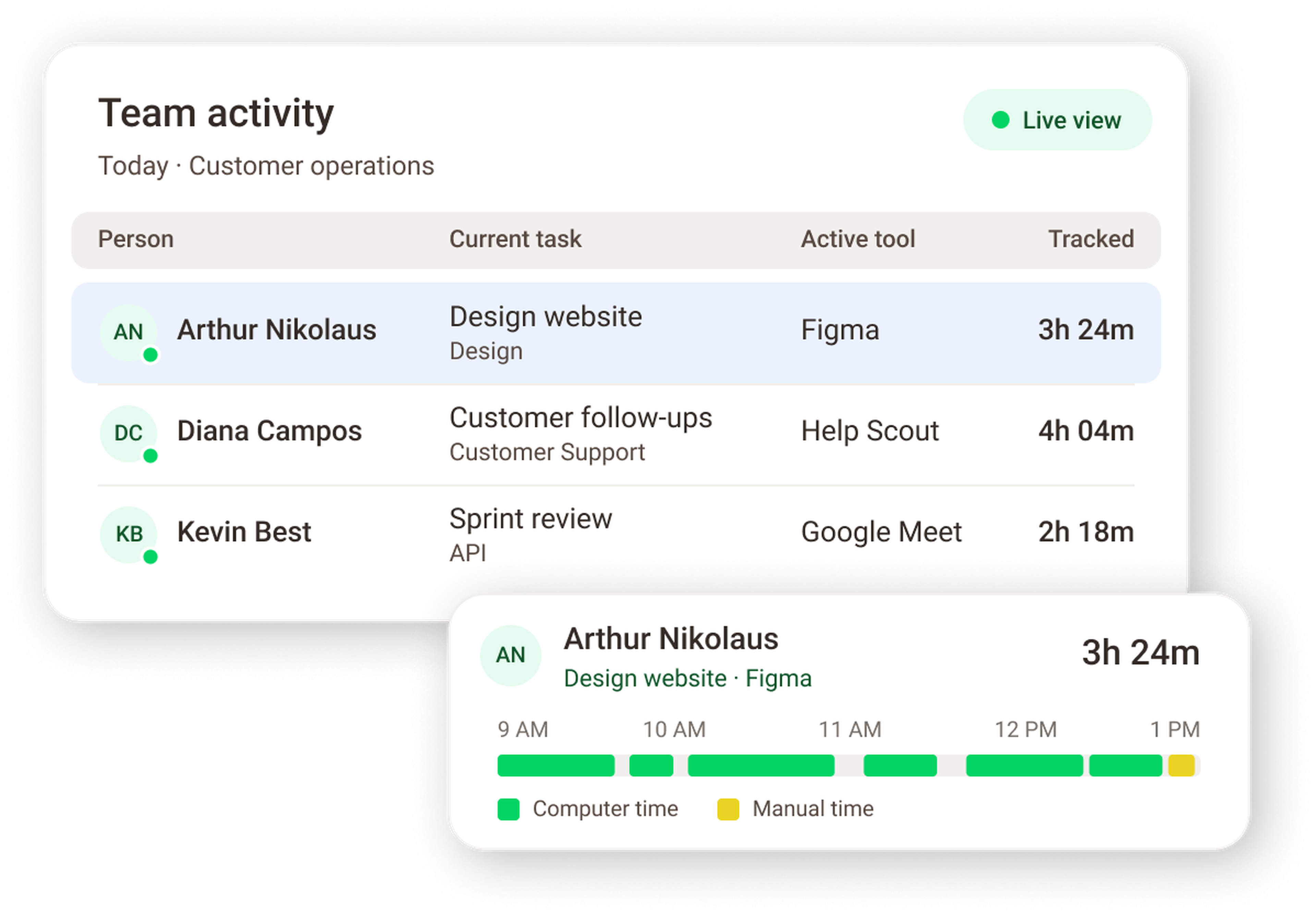
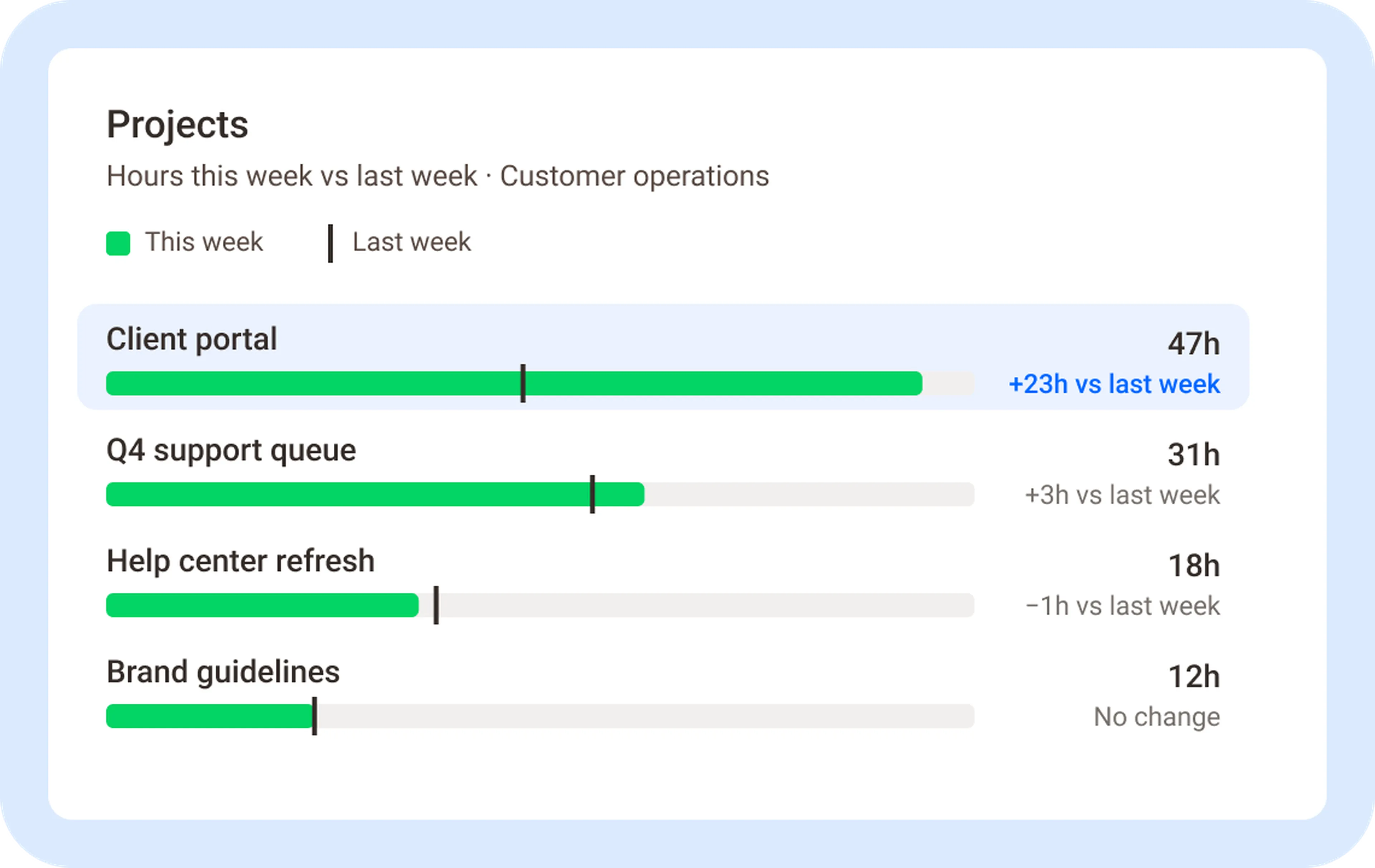






See the time, tasks, and tools across every team member, project, and location, as the day happens. All of it in one view of your distributed team.
No credit card required. Set up in under 5 minutes.
The problem
By the time the report arrives, the week is over
If you lead a distributed team, you’re probably running on status updates and gut feel. The report lands on Friday and describes last week, but the problems started days earlier.
Time Doctor shows you Tuesday’s problem on Tuesday:
One live view across people, projects, and locations
See who’s working, on what, and in which tool, for every team member and site on one screen, without chasing anyone for a status update.
Time tied to the tasks and tools it was spent in
Hours land on the project and task they belong to, with the web and app usage that explains them. You see effort and context together, so a long day and a productive day stop looking the same.
Identify problems today, before they need investigating
Spot a project running over or a queue falling behind while you can still fix it. Automatic tracking replaces timesheets and their errors, and any manual entries reconcile with tracked time.
Who it's for
Built for the leaders who run distributed teams
Operations leaders
Find inefficiencies across teams, sites, and clients. See where hours pile up on low-value work, where a process runs long, and which queue is quietly falling behind, while there is still time to move people.
HR leaders
Coaching that runs on facts. Give managers the data to coach on focus and workload, and give employees visibility into their own workday so they can manage it themselves. Performance conversations rest on numbers, not impressions.
Executive leaders
A clear view of where time and cost go, without managing the details. Open one screen and know whether the operation is on track, which teams are absorbing the most hours, and where the spend on tools and time is not returning anything.
IT leaders
See which software is actually used, by whom, and how often. Consolidate what's redundant, retire what's unused, and pass InfoSec review with role-based permissions and screenshot blurring you control.
Across industries
Finance
Insurance
Visibility to performance
When you can see the work, you can improve it
Seeing the day as it happens changes what a leader does next. A queue running long gets help before the deadline moves. A tool the company pays for that nobody opens gets retired, and the license comes back. A project burning twice its estimated hours gets re-scoped while there’s still time, not in the post-mortem.
A report tells you what happened. Activity data lets you change what happens next, and you stop paying for idle hours and unused tools.
Time Doctor AI
Ask about your team’s workday in Claude, ChatGPT, or Gemini
Bring your activity data in with the Time Doctor MCP connection, or let your Time Doctor AI agent brief you on what changed today.
Prompt
“Show tracked vs active time for the Support team yesterday, per person.”
Every number comes from Time Doctor’s tracking engine. The AI explains your numbers. It never invents them.
Value our customers see
What customers say when they can see the work
86–89%
Employee efficiency level
"Since Time Doctor, our efficiency level for our employees is between 86 to 89%."
Sarah Beth Herman
CEO, Dentistry Support
35%
More efficient development processes
"As we optimize cost-efficiency, we also commit to the productivity and work-efficiency of our staff."
Rommel Ragasa
Phoenix Virtual Solutions
50–75%
Decrease in compliance issues
"We've been able to keep good track of what hours the agents are working and what task they're working on."
Rafael Vazquez
SmartBuyGlasses
Verification without surveillance
You control what gets captured
Turn verification features on or off per role, so capture matches your policy, not a default.
Employees see their own data
With the desktop app, employees review their own hours and activity in Time Doctor. With the Automatic App for work-only devices, you decide whether they get access.
Holds up to HR, Legal, and InfoSec review
Certified, permissioned, and documented, so security review is a checkpoint, not a roadblock.

ISO 27001

SOC 2 Type 2

GDPR

HIPAA
Role-based permissions
Screenshot blurring
Manual time entry
FAQs
Time Doctor shows the time, tasks, and tools across every team member, project, and location, as the day happens. Leaders see who is working, on what, and in which applications, with hours tied to the projects and tasks they belong to.
Both. Time Doctor updates the team view as the day happens and keeps the full history for reporting. Tracking runs automatically, including offline, and manual time entry is there when someone needs it.
It depends on how Time Doctor is deployed. With the desktop app, employees review their own hours and activity. With the Automatic App for work-only devices, the company decides whether employees get access.
Time Doctor is built for verification, not surveillance. Leaders control what gets captured per role, employees can see their own data, and the system holds up to HR, Legal, and InfoSec review.
Yes. Time Doctor shows web and application usage across the team, so IT and operations leaders can see which tools are used, which are redundant, and which licenses are not returning value.
Yes. Time Doctor connects to Claude, ChatGPT, and Gemini through the Time Doctor MCP. Every answer is computed from tracked hours and respects each user's existing permissions.